Free & open source · 100% local · no telemetry

Every mistake on your PC,
one step from fixed.

Moved a folder into the void? Overwrote the good draft? Deleted the wrong thing? StepWind records what happens on your drives and lets you step back — one click, no cloud, no git, no panic.

Windows 10 (1809+) or 11 · x64 & ARM64 · MIT · verify your download

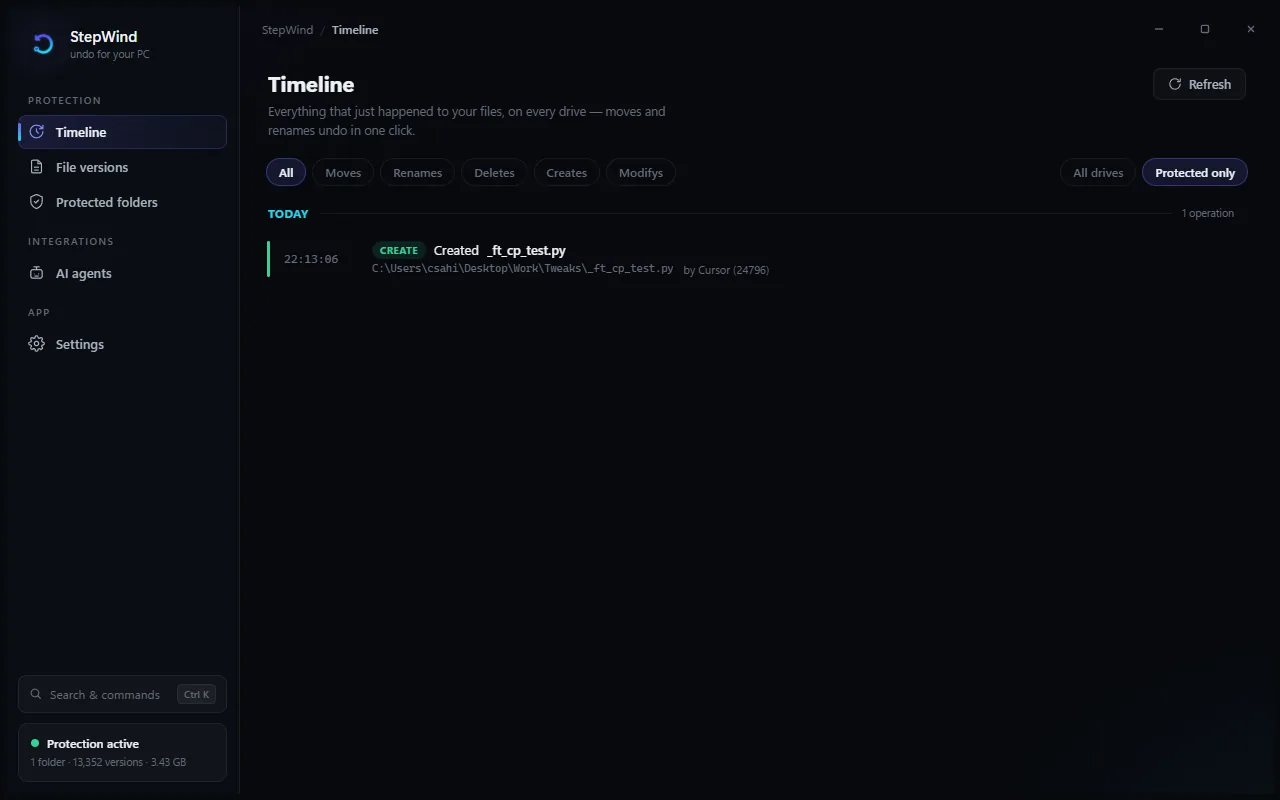
StepWind's timeline: a live, day-grouped feed of file operations across the PC, each with a one-click Undo button

The real thing — a plain-English timeline of your machine, with the process that did it and the button that undoes it.

Two layers of protection,
always on

A flight recorder for the whole machine. A time machine for the folders that matter.

Whole-machine flight recorder

StepWind reads the change journal on every drive — no folder scanning — and shows a timeline anyone can read: "Explorer moved Thesis to Archive". Moves, renames, and deletes reverse with one click; bulk operations undo as a batch.
A time machine for your folders

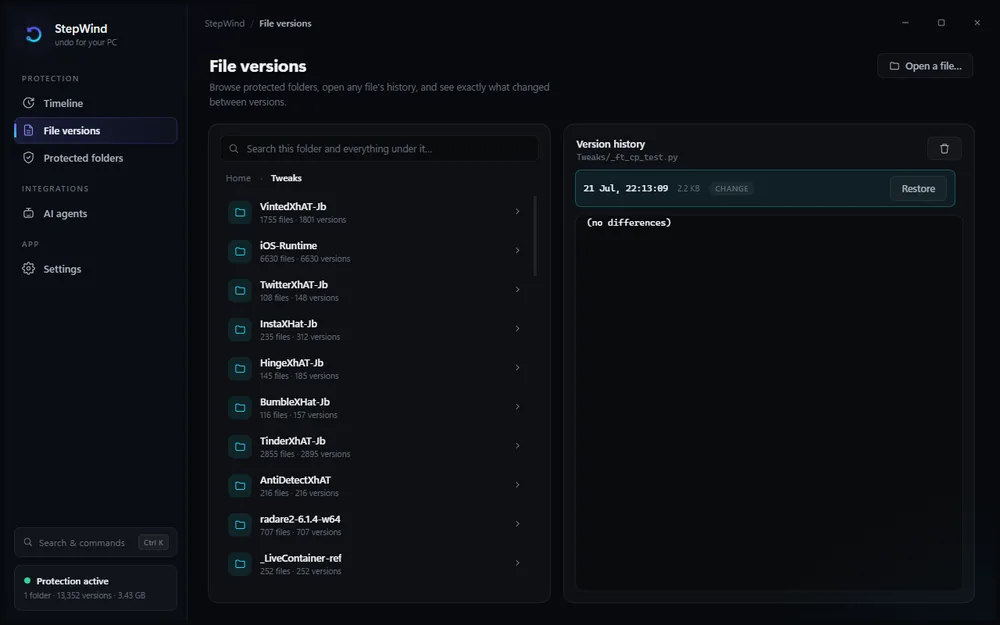
Chosen folders get continuous version history — deduplicated and compressed, so a lightly-edited 2 GB file doesn't cost 2 GB per save. Roll any file back to any earlier save, even after it was overwritten and deleted. Any filesystem, removable drives included.

Safe by construction

Restores land next to your current file, never over it. Undo refuses an occupied path. Low disk pauses capturing loudly instead of failing silently. And nothing is protected until you say so — onboarding asks, it doesn't grab.

A safety net for AI agents

A built-in MCP server lets Cursor, Claude, and friends checkpoint a file before a risky edit, diff exactly what changed, and restore — read + additive only. An agent gets the time machine, never the shredder.

Encrypted & recoverable

Optional AES-256-GCM at rest — contents and, if you want, even the index of names and dates. An exportable passphrase recovery key means encrypted history survives an OS reinstall.

Honest on shared PCs

One account can't browse, restore, or purge another's history — enforced in the service, not hidden in the UI. Updates are fail-closed: checksum + signature verified, or they don't run.

Three steps. The third one is the point.

Install and forget

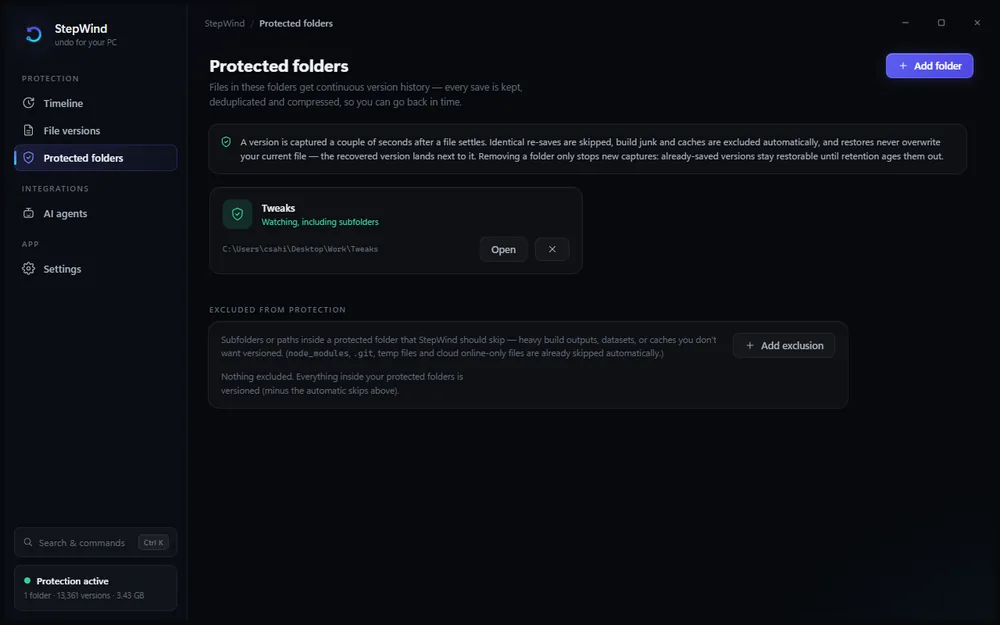
A background service starts recording immediately. You pick which folders get version history — pre-checked suggestions, zero silent grabbing. Then it disappears into the tray.

Something goes wrong

A folder vanishes into the wrong place. A save clobbers the good version. A script — or an AI — deletes more than it should. It happens to everyone; usually it costs an afternoon.

Step back

Press Ctrl+Shift+Z, find the moment, click Undo — or open the file's history and bring back any earlier save. Thirty seconds, not thirty minutes.

File versions view: browse any protected file's history and restore an earlier save Protected folders view: choose which folders keep continuous version history

Built for the
AI-coding era

AI tools edit files fast — and sometimes wrong. StepWind gives them a time machine, with guardrails welded on.

  • One-click connect for Cursor, Claude Desktop, Claude Code, Windsurf, VS Code, Cline, Gemini CLI, Codex CLI, Copilot CLI, LM Studio, Kiro — config merged safely, backup taken first.
  • Agents checkpoint before risky edits, diff latest: vs current: after, restore on regret, and undo their own bulk file moves.
  • Read + additive only. No agent can delete history, purge versions, or change settings. Ever.
  • Connecting Cursor or Claude Code also installs StepWind's Agent Skill — so the AI reaches for the safety net at the right moments on its own.
agent session

Verify, don't trust

Every release ships a SHA256SUMS.txt. Check your download in PowerShell:

(Get-FileHash .\StepWind-1.0.0-setup.exe -Algorithm SHA256).Hash
"Windows protected your PC"? Expected for a new, not-yet-signed open-source installer — SmartScreen reputation, not a malware verdict. Verify the hash, then More info → Run anyway. Free code signing via the SignPath Foundation open-source program is in progress; signed releases will remove the prompt and enable silent auto-updates.

The full trust story — update verification, IPC authorization, encryption design, and known limitations — lives in SECURITY.md.

Questions, answered honestly

Does anything leave my computer?

No. History lives on your own disk, encrypted if you choose. No cloud, no account, no telemetry. The only network call is checking GitHub for updates — verifiable in the source, and you can turn it off.

Will it slow my PC down?

The service idles on the change journal — a log the filesystem already writes — instead of scanning folders. Captures are debounced, deduplicated, and compressed in the background. If capturing ever pauses (low disk), it says so instead of quietly eating resources.

How much disk space does history use?

Versions are content-deduplicated and compressed, retention thins old versions to hourly → daily → gone, and there's a hard size cap you control plus a low-disk guard that pauses capturing before your drive fills.

Can it recover files deleted before I installed it?

No — and a tool that claims otherwise is guessing. StepWind protects from the moment it's installed: saved versions restore even after deletion, and recorded moves/renames reverse.

What happens on a shared PC?

Each Windows account's history is isolated — one account can't browse, restore, or purge another's through StepWind. Enforced in the service, not just the UI.

How do I uninstall?

Windows Settings → Apps, like anything else. The uninstaller stops the service, removes the app, and asks what to do with your stored history — nothing is deleted silently.

MIT licensed · no upsells · no “pro” tier

The next mistake
doesn't have to matter.